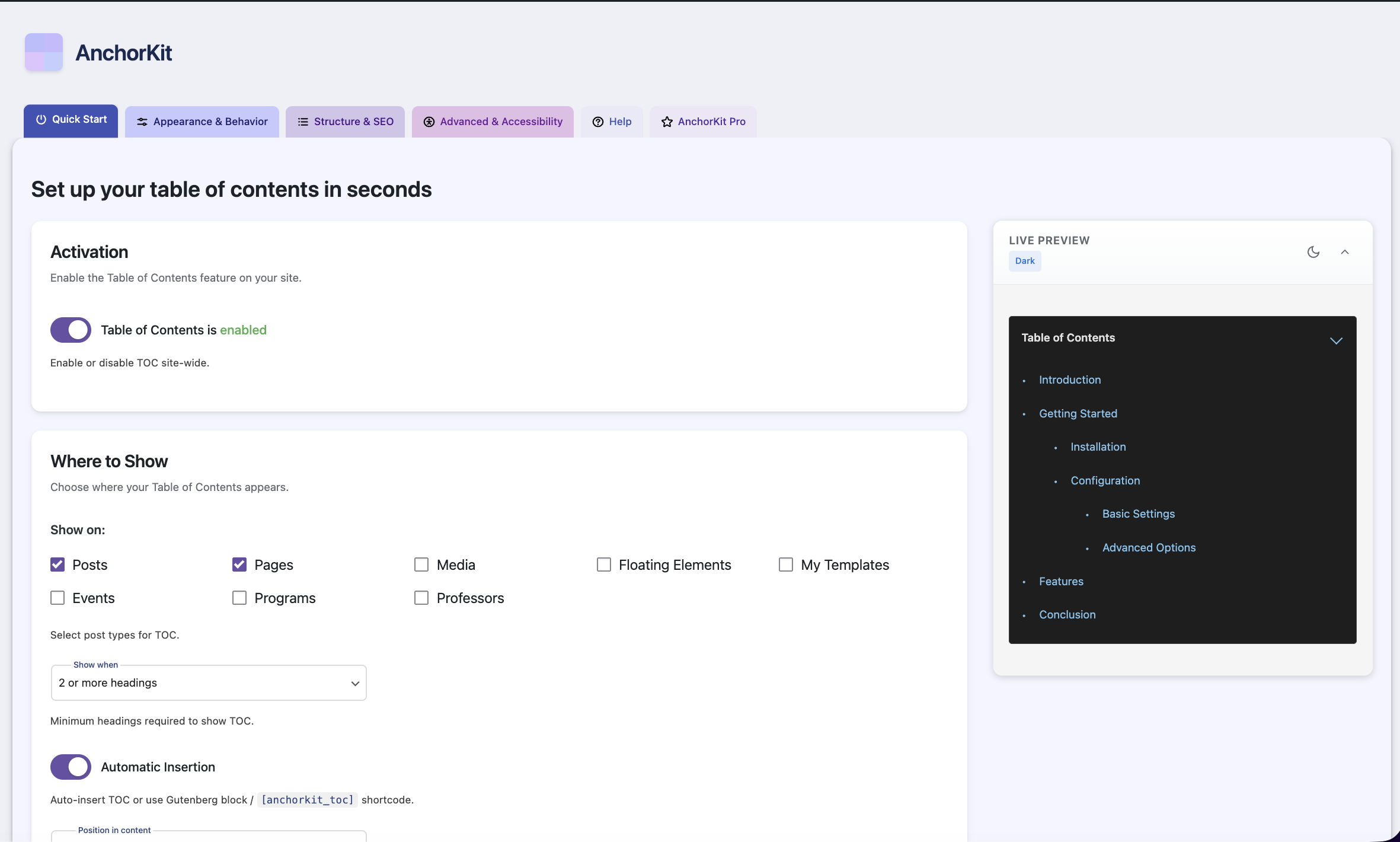
Overview
AnchorKit is a WordPress plugin I designed, built, and shipped end-to-end: an accessibility-first table of contents plugin with a live WYSIWYG settings experience. No client, no brief, no deadline. Just a category I'd noticed was underserved on the design front, and a hypothesis about what a more thoughtful product could look like.
It's live on the WordPress.org directory, passed the review process on first submission, and taught me more from what didn't work than from what did.
The Gap
A handful of plugins dominate the category with hundreds of thousands of installs between them. Spend an afternoon inside their settings panels and the product gap is obvious.
Dated Default Output
Heavy borders, default link styling, no consideration for the surrounding content. Customizing is possible, but the defaults set the tone.
Dense, Confusing Settings
Unstyled WordPress admin forms. Long lists, terse labels, no grouping. Designed to expose options, not to help users decide.
No Live Preview
Save, reload the front-end in another tab, check, return, repeat. The category collectively decided this was acceptable.
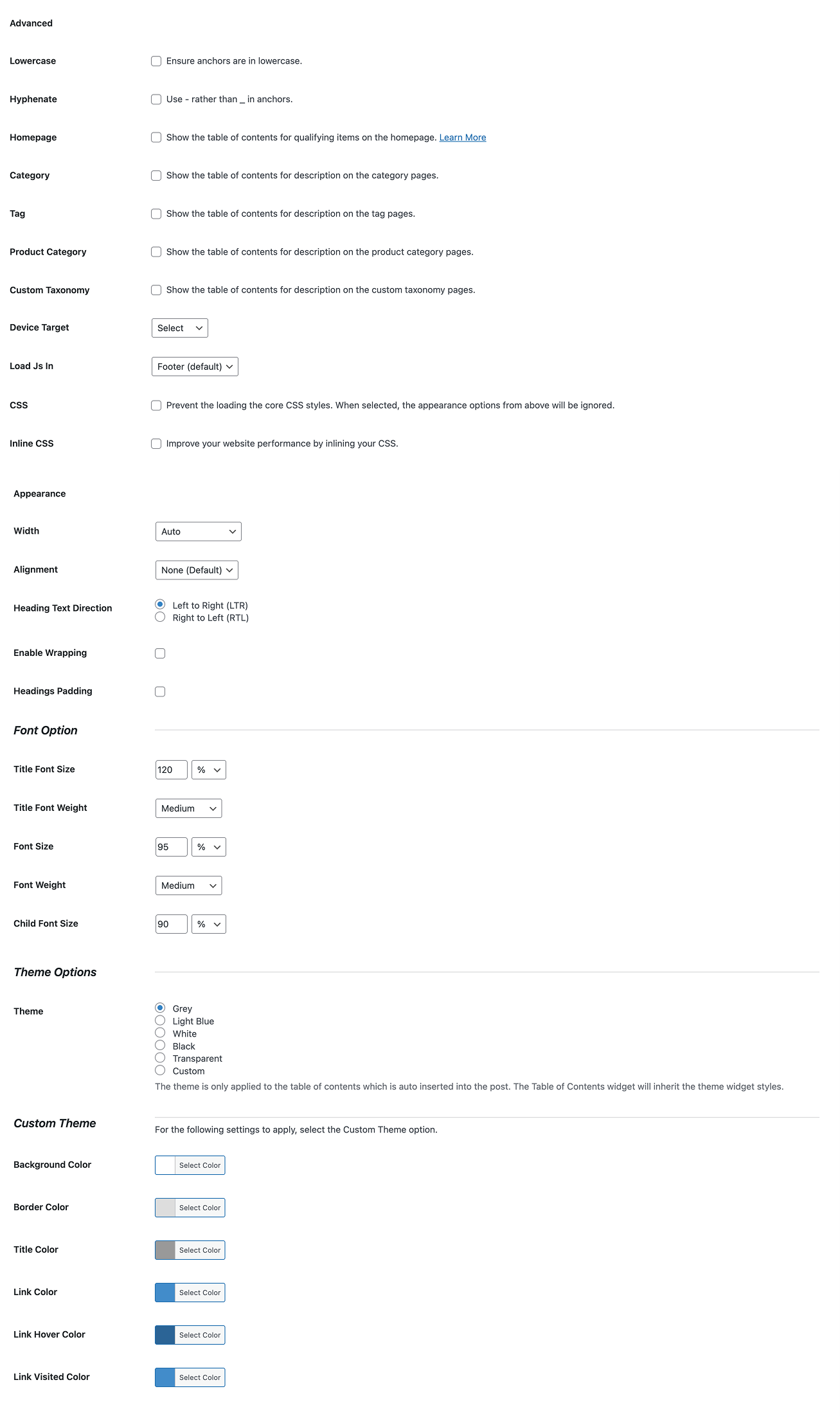
Existing settings UX in the category
The hypothesis: users would prefer a TOC plugin where every setting reflects instantly in a live preview that mirrors the actual front-end. No save buttons, no reloads, no guessing.
A clean hypothesis. Also the wrong starting point, but I'll come back to that.
What I Built
Live Preview, Production-Truth
Most "live preview" features in WordPress plugins approximate the front-end through a separate, simplified rendering path. AnchorKit's preview renders through the exact same code path as production. Every preview frame is the HTML the live site would output.
That made it the most technically demanding part of the build. To avoid flooding the database with intermediate states, a debounced AJAX layer writes settings normally, then renders the preview using temporary option overrides that intercept reads without polluting the cache. Higher technical cost, but the user can actually trust what they see.
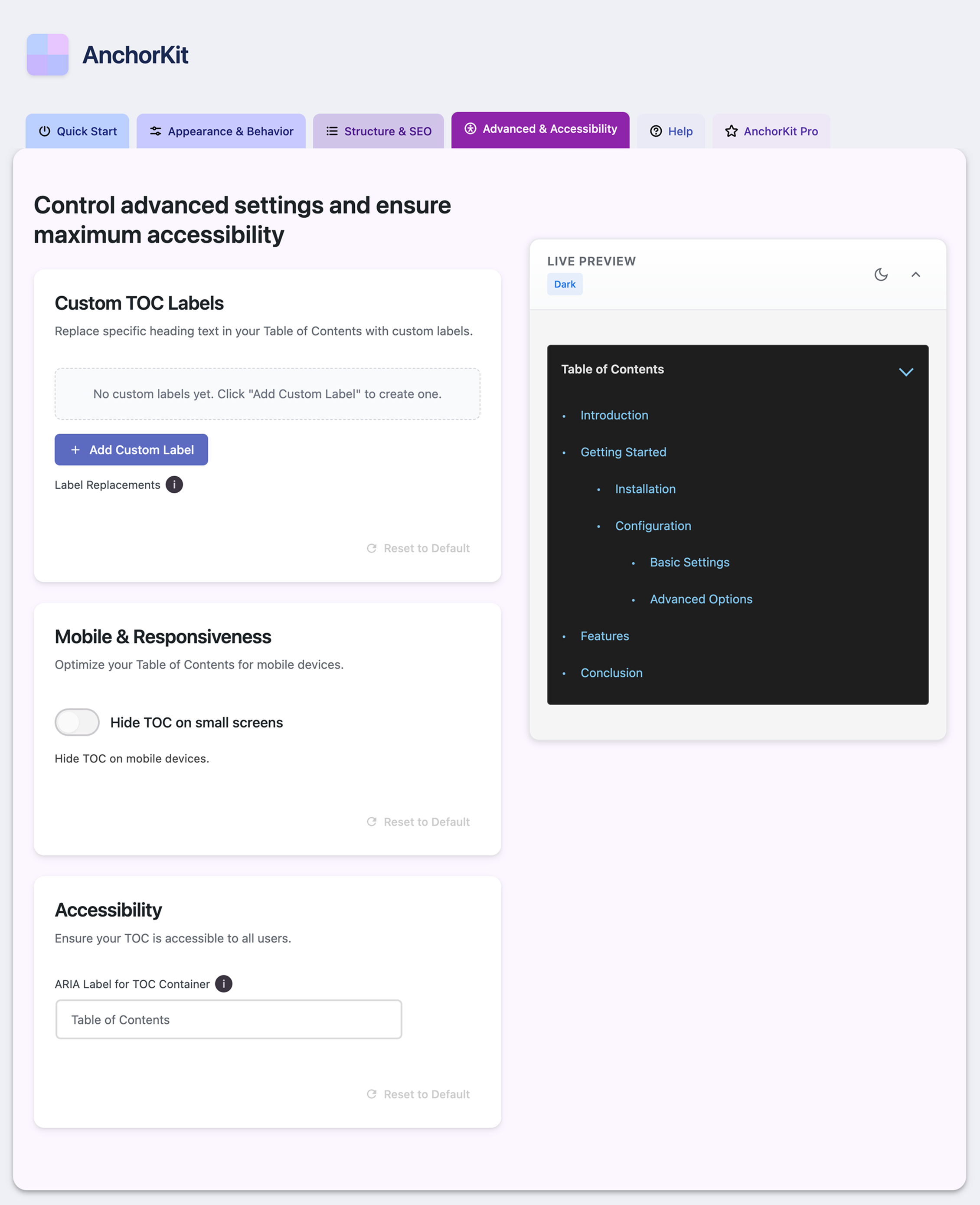
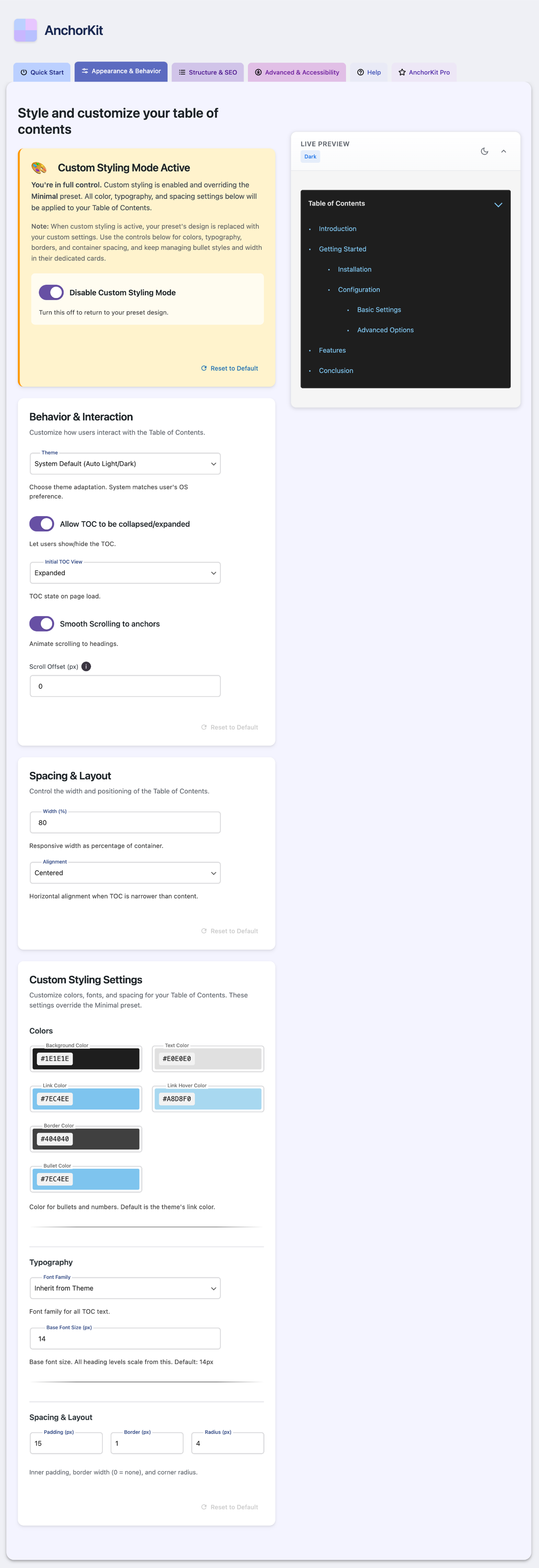
Settings panel with live preview
Depth Without Density
Fifty-plus persisted options: light and dark palettes, typography, layout, animation, scroll behavior, anchor ID format, post-type targeting, mobile breakpoints. Exposed as one long form it would be overwhelming, so the interface is tabbed and grouped, with sensible visible defaults. Every option is also overridable per-instance via shortcode attributes or Gutenberg block controls, so one page can run multiple TOCs without fighting global settings.
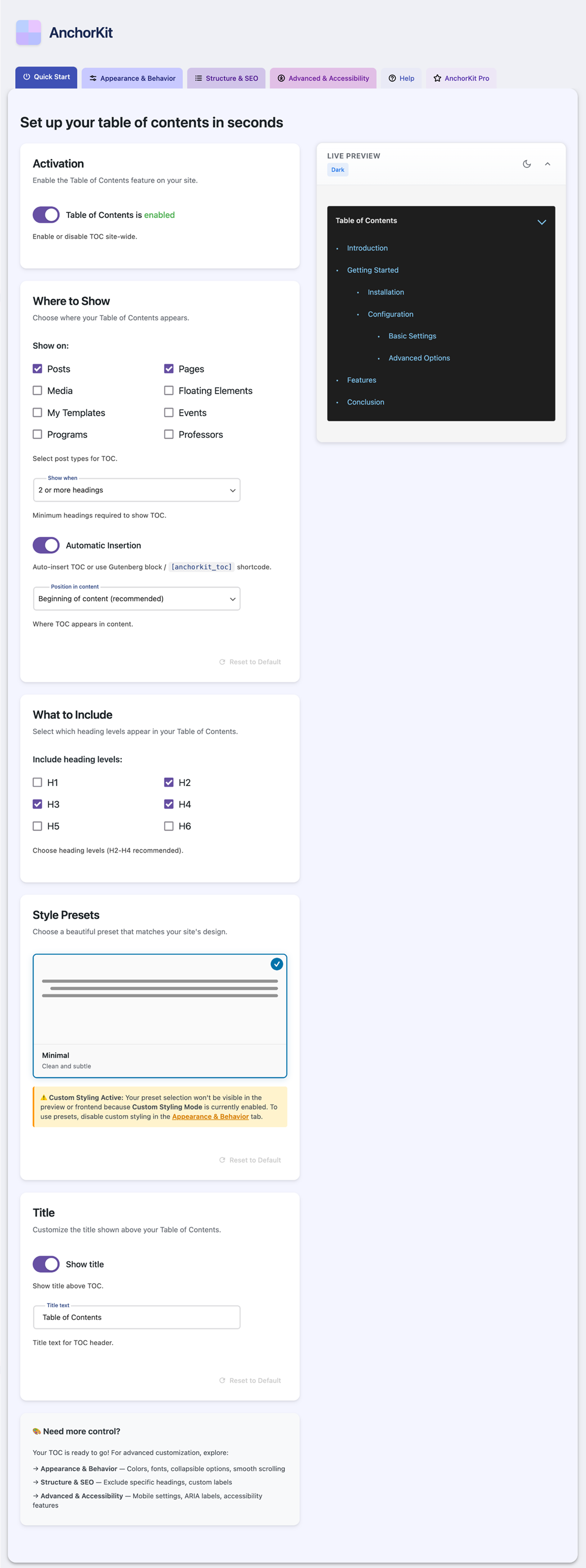
Tabbed settings, depth without density
The Details That Don't Show Up in Screenshots
Anchor IDs That Match Gutenberg's Behavior
WordPress core generates anchor IDs for heading blocks with specific slugification logic. Most TOC plugins use their own, so links can silently break on hybrid pages. AnchorKit deliberately matches core's behavior, including the underscore-stripping quirk.
Accessibility as Default
The TOC ships as a nav element with proper ARIA labelling. Toggles are keyboard-accessible buttons with aria-expanded and aria-controls. Theme switching runs on CSS custom properties, instant and with no flash of unstyled content. Accessibility shaped the markup from the start, not at the end.
No Custom Database Tables
All data lives in the standard options table with a consistent prefix. Uninstalling cleanly removes every trace, including across multisite networks. Respect for the user's database is rarer than it should be.
A small favorite: each TOC entry can show the estimated reading time for that section, not just the full post. It answers the question readers actually have, how much am I committing to if I jump here, inline where the decision is made.
How It Got Built
I designed the architecture, the UX, the settings model, the visual language, and the microcopy. I used Claude Code and Cursor to write most of the implementation, with my judgment driving every meaningful design and architectural decision: how the preview avoids cache pollution, how anchor IDs match core, how multisite uninstalls iterate every site, where to draw the line on customization depth.
The plugin passed the WordPress.org review on first submission. Strict prefixing, escape-on-output, nonce verification on every privileged operation, GPLv2, transparent telemetry, no obfuscation, no external scripts at install.
The relevant detail isn't the code. It's that the design intent survived all the way to a shipped, audited product, with no compromises forced by handing off to someone who didn't share the vision. AI tooling makes that level of end-to-end ownership newly possible for designers with strong product judgment. AnchorKit was, in part, a deliberate exercise in finding the limits of that.
Front-end output, clean and accessible by default
What I Learned
A clean UX hypothesis is not a validated market opportunity. The design gap was real, but I never asked whether the people using the incumbent plugins were actually frustrated by it.
The honest answer, which I figured out after shipping: most users install a TOC plugin once, click save, and never open the settings again. The category isn't underserved by design quality. It's underserved by anyone marketing design quality as a reason to switch. Those are different problems, and I had only solved one of them.
Shipping a polished product is half the work. The other half, talking to users, validating the pain, finding the channel, I'd quietly treated as someone else's job. It isn't. If I started over today: a landing page first, conversations in WordPress communities, a smaller version shipped sooner, real usage telling me what to invest in. Instead I built the full thing and then learned the lesson. Worse order. But it stuck.
Postscript: the plugin recently picked up its first paying customers, including a 10-site license, with zero marketing behind it. The design quality is converting, just slowly and organically. Which is the lesson in miniature: the product was never the problem, the distribution was. Validation and marketing first would have compressed "eventually" into "immediately."
Outcome
Live and Audited on WordPress.org
Passed the wp.org review process on first submission: security, escaping, prefixing, accessibility, licensing, telemetry transparency.
First Paying Customers
Organic, unmarketed conversions, including a 10-site license. Early, but real: strangers paying for the design quality the category lacked.
A Validation Discipline I Now Apply
Every product hypothesis since goes through validation before meaningful build work. Build is no longer the first move.
Proof of End-to-End Ownership
A 0-to-1 product designed, architected, built, audited, and shipped by one person.
Reflection
AnchorKit taught me the difference between being able to build something and building something that should exist. They sound like the same thing. They aren't.